
Registering on Binance takes five steps: come in through the official site, create the account with an email or phone number, add the invite code, verify your identity and turn on two-factor authentication. At each step below we note where scammers usually try to get in.
One note: this piece covers only registration, plus how to use the invite code. How to deposit and buy your first coins afterward is covered in more detail in our separate piece, the full flow from registration to buying — read that before you buy.
- Come in through official channels: verify the domain; download the app only from official app stores.
- Register with an email or phone number, and set a unique, strong password.
- Enter invite code
BN1606at the registration step (enter it at sign-up; new accounts that missed it can bind within 30 days if eligible). - Complete KYC identity verification (upload documents per the official prompts).
- Turn on two-factor authentication (2FA) immediately — this step matters even more than registering itself.
Step 1: Come in through official channels (the most important step)
The most dangerous part of the whole flow is the very first one. Clone sites and fake apps look almost identical to the real thing, and the moment you register or deposit on one, your money and account go straight to the attacker. So before you walk in the door, get a few things straight.
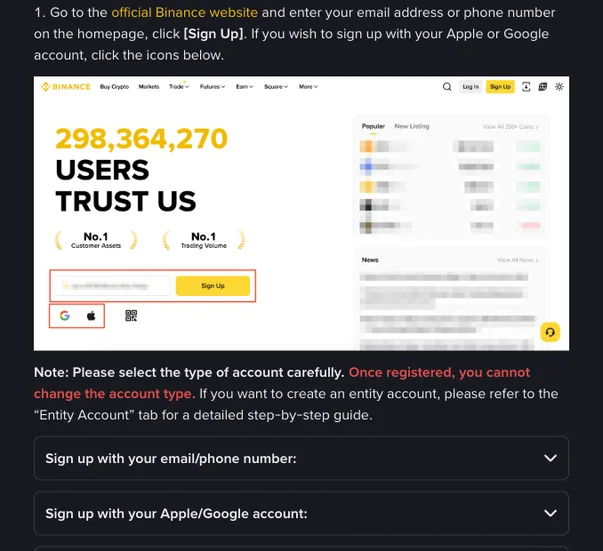
Coming in through our on-site Binance registration entrance redirects you to Binance's official page, with the invite code already attached. It's a referral link, but it routes you through the official registration page and doesn't affect your costs in any way. Binance.com isn't available in every country; check that it serves where you live before signing up.
Step 2: Register with an email or phone number
Open the registration page and it'll ask you to pick one of two: email or phone. Either works; the difference is small. We'd suggest using an email you use long-term and that itself has a strong password and 2FA enabled.
- Enter the email (or phone number) and set a login password.
- The password must be unique: don't reuse the one you use on other sites or other exchanges, so a leak on one site can't open your other accounts.
- The system sends a verification code to your email/phone; enter it to finish this step.
Step 3: Enter invite code BN1606
The registration page usually has a "Referral Code" field, sometimes folded under an "optional" toggle that you need to expand. Enter BN1606 here.
Beginners skip this step easily, but it has one important property: the invite code is easiest to enter at registration; once the account exists, there's little room to fix it. A new account that missed it can bind one on the Referral page only if all of these hold: registered within the last 30 days, no deposits or trades yet, no existing referral relationship, a main account, ID verification not used on another account in the past 180 days, and not flagged for wash trading. A bound referral can't be changed or removed. With a valid code entered, your trading fees get a discount — with this site's code, up to 20% — so just add it while you're there.
Step 4: Complete KYC identity verification
Binance requires new users to verify before depositing or trading; its Help Center says reviews usually finish within 48 hours. It's an anti-money-laundering requirement, not Binance singling you out.
- Following the on-screen prompts, enter basic details like your name and upload an ID document.
- Most flows include a liveness check or document photo step; just follow the system's instructions.
- Don't resubmit while it's under review; wait for the result notice.
Step 5: Turn on two-factor authentication (2FA) immediately
Don't rush to deposit after registering — set up the locks first. Two-factor authentication is the core of account security: logins and withdrawals require an extra rotating code, so even a leaked password is hard to act on.
- Prefer an authenticator app (Google Authenticator, Authy) over SMS — SMS can be hijacked through a SIM swap, an attack police and mobile carriers have repeatedly warned about.
- When you bind it, write down the recovery/backup key offline and keep it safe — you'll need it when you switch phones.
- If you can, also enable a "withdrawal address whitelist" so funds can only be withdrawn to addresses you pre-set.
Invite code BN1606; any trading-fee discount is up to 20%, subject to current Binance terms and eligibility.
Common Binance sign-up mistakes: a missed invite code, no 2FA, and how to fix them
Pulling the easy-to-mess-up points out for a side-by-side gives you a steadier footing.
| Stage | Common beginner mistake | The right move |
|---|---|---|
| Entry | Clicked a random link / installed a clone app | Verify the official domain; only install from official stores |
| Password | Reused one weak password everywhere | Set a unique, strong password |
| Invite code | Skipped it at signup, noticed only after depositing or trading, when binding was no longer possible | Enter BN1606 at the registration step |
| KYC | Used a "verify-for-you" service to save effort | Complete it yourself on the official page |
| Security | Deposited right after registering, no 2FA | Enable 2FA first, then consider depositing |
The invite-code field is often folded under an "optional" toggle, so it's easy to miss. Check that it's filled in before you tap Next.
Frequently asked questions
Do I need an invite code to register on Binance? What happens if I skip it?
BN1606) gives you a trading-fee discount, so it's worth adding while you're there.