Someone sends you a link, an account that says it's customer support, or a Telegram group that claims to be official, and you want to know whether it really belongs to Binance. You don't have to go on gut feeling. Binance has a page built for exactly this: paste in the web address or account, hit search, and it tells you whether that source is on its official list. It's Binance's official verification page, at https://www.binance.com/zh-CN/official-verification (the address as it appeared when we opened it in September 2026). That link is the Chinese-language version of the page, which is the one we used, so every piece of on-screen wording quoted in this article is our own English translation; the page's English version may phrase things differently.
You need to be able to read both results. If nothing comes up (first go back and make sure you picked the right category), stop interacting with whoever sent it, and don't click any link they've sent you. If it does come up, that only tells you the source is official; it says nothing about whether what they're asking you to do is right. That second half isn't us embellishing. It's a fixed notice the page prints right below the search box: "Binance Verify is an auxiliary verification tool. It does not represent authorization of any action or a commitment to list any token."
The five things this page can check, and why the category has to match
The line at the top of the page spells out what it's for. It reads: "Stay away from scams. Enter a URL, email address, phone number, Telegram or social media account to check whether the source is verified and officially from Binance." Five kinds of source, one search box.
Above the search box is a row of categories to choose from, set to "Webpage" by default; the placeholder in the input box reads "Enter query item", and to its right is a "Search" button. That's the whole interaction, and the easiest place to go wrong is the category, which has to match what you paste in. Check an account name under "Webpage", or a web address under social media accounts, and the result won't be right; the page only says that choosing the wrong tab will affect the verification result. It makes a point of saying so in the unverified pop-up, which we quote in full in the next section.
There's one more thing at the very top of the page that's easy to skip over as decoration: a notice bar that reads "URL verification: https://www.binance.com". It isn't about the source you want to check. It's the domain of the very page you have open right now. In other words, the page verifies itself first and shows you the result. We'll come back to why that matters in section five.
A word on the limits of what we did: the only category we actually tested by hand is "Webpage". We don't describe what the results look like for email addresses, phone numbers, Telegram or social media accounts, because we haven't tried them ourselves. Nor does the page say how many entries its list holds, how often it's updated, or whether subdomains count, and we don't know either.
When nothing comes up, this is the pop-up you get
To see exactly what "not found" looks like, we made up a plausible-looking domain to try: binance-vip-support.com. The string is invented and doesn't correspond to any real scam; the idea behind it was to put the real brand name first and tack a reassuring word or two on after it.
With the category left on the default "Webpage", we hit search, and this is what popped up:
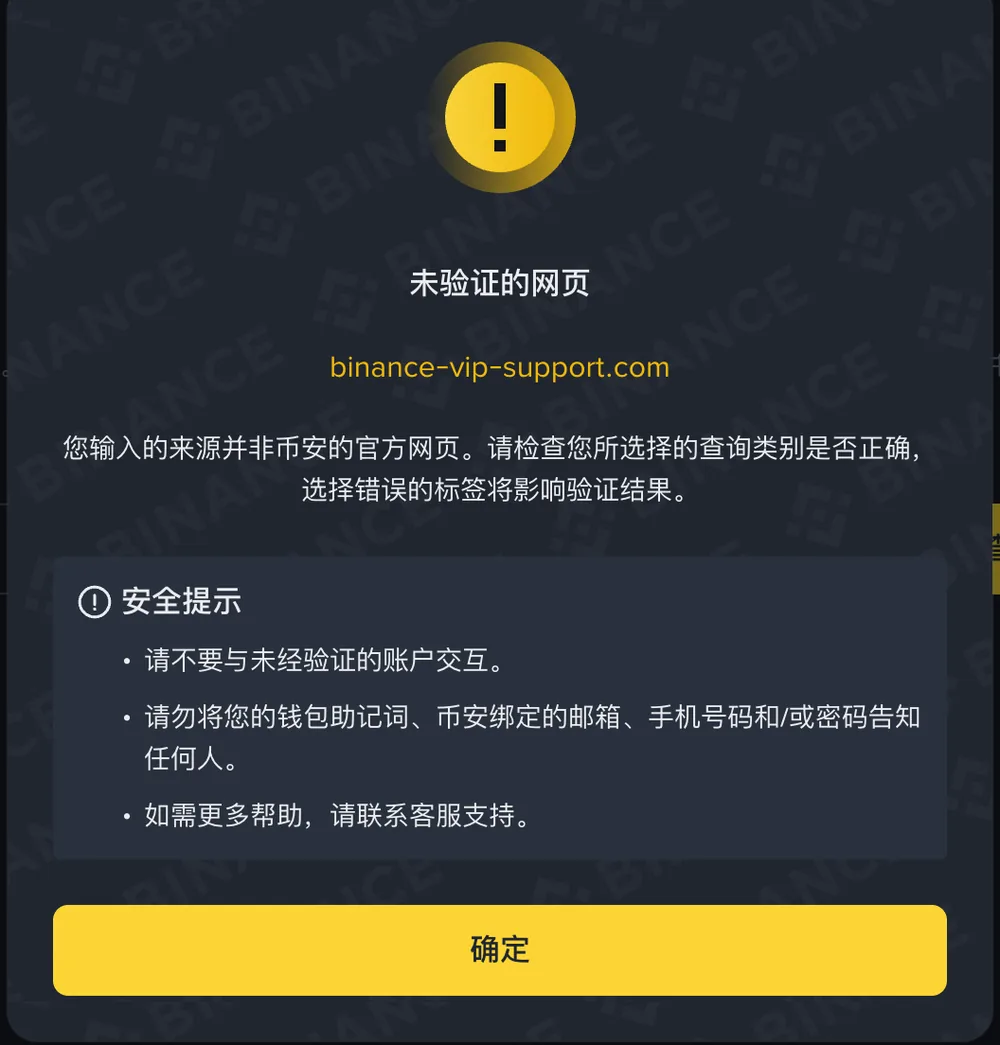
The title is "Unverified webpage", followed by the string you just typed, and the body text reads: "The source you entered is not an official Binance webpage. Please check that the query category you selected is correct; choosing the wrong tab will affect the verification result." The pop-up also carries three safety tips, which read, in order: "Please do not interact with unverified accounts." "Do not tell anyone your wallet seed phrase, or the email address, phone number and/or password linked to your Binance account." "If you need more help, please contact customer support." At the bottom is an "OK" button.
Read this pop-up on two levels. The first is the thing it warns you about itself: a not-found result may just mean you picked the wrong category. So when you see "unverified", don't jump to a conclusion; go back, check the tab, and search again.
The second level is the one that actually helps you. Say the category was right, and a web address or account claiming to be Binance can't be found on Binance's own list: then you have no reason to keep trusting it. Note that this doesn't work in reverse. Not being found doesn't mean the other side is definitely a scammer, and the page makes no such promise. But you were never trying to convict anyone; you're deciding whether to keep talking. Those two things have very different bars to clear: the first is beyond you, the second you can do at any time.
When it is found, that tells you less than you'd think
Search again with www.binance.com and the pop-up title changes to "Verified webpage", with a single line of body text: "The source you entered is an official Binance webpage." Short and to the point.
Next comes the part most easily misread. The page's fixed notice puts it bluntly: it does not represent authorization of any action or a commitment to list any token. In plain terms, it verifies the source, not the action. Someone genuinely messaging you from an official domain doesn't make the transfer, the project or the contract they're pushing the right thing to do; and a coin turning up in an official channel doesn't mean anyone has promised it will be listed. This page answers the first question, "is this web address fake?" The second, "is what this person wants me to do right?", it doesn't answer. For how this kind of pitch builds step by step, see our field guide to "pig butchering" scams.
The verified pop-up also comes with two safety tips, quoted here in full. The first is about your device: "Even if the website is official, stay alert when using any plug-ins, keyboard and mouse-click recording software/macro recorders, or untrusted VPNs or proxy servers, to avoid losing assets." The second is about moving funds: "Before trading, carefully check the deposit and withdrawal addresses on a blockchain explorer. Also, be sure to make a small test withdrawal first before sending a larger amount." Neither one protects you from fake websites. Both guard against problems on your own side: a genuine web address doesn't mean the computer you're using is clean.
| Pop-up title | What the page says (excerpt) | What you can conclude | What you can't conclude |
|---|---|---|---|
| Unverified webpage | The source you entered is not an official Binance webpage; check that the query category is correct | If the category was right, there's no reason to keep interacting with this source | That the other side is definitely a scammer |
| Verified webpage | The source you entered is an official Binance webpage | This source itself is official | That what they're asking you to do is right, or authorized |
One rule holds without any check
The verification page also carries one sentence that, for a newcomer, is more useful than the search function itself: "Binance will never ask for any funds or tokens through private messages."
What makes this sentence so useful is that it doesn't depend on any search result. Their account shows up, and they message you privately asking you to send coins: stop. Their account doesn't show up, and they message you privately asking you to send coins: all the more reason to stop. The search is for situations you're unsure about, while a private message asking for funds needs no judgment call from you at all. Binance has already said it in no uncertain terms; all you have to do is follow it.
The same logic applies to the word "support". There's only one thing Binance has stated flatly: a private message asking for funds or tokens is fake. So if someone in a private chat tells you to send coins to some address to "unfreeze" your account, "verify your funds" or "activate a limit", it ends there, whoever they claim to be. There's a whole set of checks you can run yourself against fake apps and fake support. Our piece on telling real exchange apps and support from fakes breaks them into five small steps that each take 30 seconds, and it pairs well with this page.
Before you search, do two things first
This section is our own advice; the page itself doesn't set any of it out.
First: don't "verify" by following a link the other person sent you. It isn't hard to fake a verification page that looks identical, and if you paste their domain into a page they built themselves, of course it will say "verified". Type the official address in yourself to reach this page, or save it as a browser bookmark in advance and from then on only go in through the bookmark. The checking tool and the thing being checked should never be handed to you by the same person.
Second: before you search, take a look at the address bar of the page you're on. The URL notice bar at the top of the page, mentioned earlier, exists for exactly this: to show whether the page you're reading really sits on binance.com. That look takes less than three seconds, yet it decides whether the search that follows means anything at all.
One more point, about timing: the easiest moment to do both of these is before anyone is rushing you. Once someone on the other end of a chat is firing off message after message saying "only two spots left", it's very hard to stop and type out a check. So you might as well bookmark that page now, rather than hunting for it on the day you need it.
Still unsure after checking?
Scroll down the verification page and you'll find a "Security tips" section with three entry points: "General security principles", "Common mobile scams" and "What is phishing?". We didn't click through and read each one, so all we'll tell you here is where to find them, not what they say.
There are also two paths on this site you can take next. If you're still at the stage of working out who you're dealing with, go back to telling real exchange apps and support from fakes, which gives you steps you can follow directly. If money has already gone out, read got scammed in crypto: can you get the money back?, which sets out the order in which to report it and pursue your claim.
The verification page answers only one question: is this source Binance? Whether to trust the person on the other end is a different question, and the search box has no answer for it. The first question takes a minute to check. The second needs you to stop and think it through yourself, and that pause is exactly what the other side least wants you to take.